
 For Shopify merchants
Prevent return fraud without replacing your returns flow.
One link, pasted into the process you already run. Your customer photographs the item live. You see the damage, and whether the photo is real, before you refund.
The issue
This crack was added to a real product photo in under a minute.
Drag across the mug. The left side is the original catalogue shot. The right side is the same photo with a crack through the rim and the handle. Reverse image search will not find a source, and there is no EXIF that proves it is real. If your returns inbox accepts a file, it accepts this.


What you get
The customer shoots it. You see whether it is real.
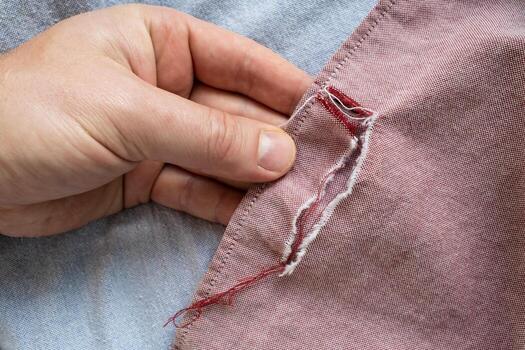
Photo 2 of 3 · Damage close up
Camera only. No gallery, no file picker, nothing to install.
Order #1043
Torn seam · refund requested
- Taken on a real phone camera, in the browser
- Not a screenshot or a photo of a screen
- Shot 6 seconds after the video of the item
- Attached to the order number the customer typed
You still make the call. Approve it, decline it, or ask for more.
Illustrative example.
What it costs
You are refunding claims you cannot check.
Returnless refunds paid on a photo
If you never see the item, the image is the claim. A gallery upload is the easiest thing to fake.
Wardrobing and empty-box claims
A reason code and a note is all Shopify returns gives you. Anything visual means chasing the customer.
Chargebacks with nothing to attach
When the customer disputes the charge, an emailed JPEG from last week is a weak rebuttal. A live capture, hashed and timestamped, is not.
Agents waiting on an inbox
Every “can you send a photo of the damage” email is a delay, and the photo that comes back is whatever they chose to send.
What unverified refunds cost your store.
Orders and average order value are yours. Return rate starts at 20%.
Currency
20% of those refunds is treated as fraud. That is this calculator’s assumption, not a measured catch rate. One check per return.
You save
$471 a month
$5,652 a year, after Starter at $29.
- Refunds $2,500
- Fraud at 20% $500
- Checks 50
- Plan Starter · $29/mo
- You keep $471 a month
How it works
One link for your whole store.
01
Send the link
The same one every time. Your customer types the order number they already have.
02
They shoot it live
A short video of the item and three photos, in the browser. No app, no account, no gallery.
03
You decide
The photos and a pass, review, or fail land in your dashboard within seconds. You still approve or decline.
Fits the flow you already run
It sits beside the returns process, it does not replace it.
Shopify native returns
Paste the link into your return notification, or send it when you review the request. Shopify still issues the label and the refund.
Loop, ReturnGO, and AfterShip
Add the link as a step in the portal your customers already walk through. Their return request stays in that app.
Email, chat, and manual returns
A Gorgias or Zendesk macro, or a reply you paste yourself. No app install and no theme edit.
Your own RMA
Create a session with an order reference over the API. We POST session.completed back to you when the photos are in.
Pricing
Start free. Upgrade when the checks are worth it.
You are charged when a customer submits photos, not when they open the link.
Free
Free
10 checks a month
Starter
$29 / mo
100 checks a month
Unlimited
$99 / mo
Unlimited checks
Questions
Before you change anything.
Do I have to install an app?
No. A link in a return email, a helpdesk macro, or a step in the flow you already run is enough. No theme edits, and the customer does not create an account.
Does this replace Shopify returns, Loop, or ReturnGO?
No. Those still handle the return request, the label, and the refund. VerifiedReturn only collects the evidence before you approve it.
What if the customer will not use their camera?
The capture page has no gallery upload, on purpose. If they cannot take a live photo, you fall back to the process you already have.
When am I charged?
When a customer submits photos, not when they open the link. The free plan includes 10 checks a month.
Works alongside Shopify returns
Stop refunding damage you never saw.
Send one link. Your customer photographs the item live on their phone. You see the damage and whether the photo is real, before you approve the refund.